
Coming up in July will be a pair of live Q & A sessions with Michael Crump of IBM on the Enhanced 3270UI. This is a good chance to talk to OMEGAMON R&D about Enhanced 3270UI and the future of OMEGAMON in general.
The events will be on July 24th at 2 PM Eastern Time, and July 25th at 10 AM Eastern Time.
If you are interested in attending, please email me (Ed Woods of IBM) at woodse@us.ibm.com to get signed up. Please tell me who you are, what is your company or organization, and if you are a current OMEGAMON customer.
Friday, June 28, 2013


Thursday, June 27, 2013
Check out a webcast on integrating OMEGAMON and System Automation
On July 18th there will be a webcast, "Improve availability and productivity with proactive automation".
The webcast will discuss how using OMEGAMON to improve zEnterprise monitoring – interfaced with System Automation for z/OS – can increase availability as well as decrease unnecessary operations workload. Proactive automation enables correlation of problems across applications and drives automated problem resolution without manual overhead.
I've blogged quite a bit in the past about how you can integrate OMEGAMON and SA. This is another chance to learn about the benefits of merging these technologies.
The event is July 18th at 11 AM Eastern Time. The price is right, it's free.
Here's a link to attend:
https://ibmsystemsmag.webex.com/mw0307l/mywebex/default.do?nomenu=true&siteurl=ibmsystemsmag&service=6&rnd=0.4258345698996625&main_url=https%3A%2F%2Fibmsystemsmag.webex.com%2Fec0606l%2Feventcenter%2Fevent%2FeventAction.do%3FtheAction%3Ddetail%26confViewID%3D1251529409%26%26%26%26siteurl%3Dibmsystemsmag
Tuesday, June 25, 2013
Using STATICCOLS to control scrolling in enhanced 3270ui
One feature of the enhanced 3270 ui is the ability to scroll a display or subpanel from side to side. How often you may need to scroll will depend on such things as the amount of data to view and how many lines and columns you defined when you set up your 3270 emulator session.
When you scroll you can have certain information on the left portion of the display stay in view. This makes it easier to keep information in context as you scroll. You can control how many columns will remain as static and stay in the display. The STATICCOLS parameter controls how many columns will stay in view on the screen.
Below is an example of the STATICCOLS parameter as used in and OMEGAMON IMS display. You can see in the example below the position of the static column (after IMS Region Name). This is set by setting STATICCOLS to 1. If you wanted to keep more information on the left of the screen static (such as IMS ID and Region Type) the set STATICCOLS to 2 or 3.

Thursday, June 20, 2013
Analyzing a Tivoli Data Warehouse collection issue
This scenario is an example of a discussion I had recently with an OMEGAMON user. The user wanted to be able to analyze issues in the Tivoli Portal (TEP) using history data from the Tivoli Data Warehouse (TDW).
Fair enough. At first glance it looked like the history data was configured. However, when the user tried to access the history data, no information was being returned.
Here's an example of what we were looking at in the the history collection popup. In this example the user wants to see IMS bottleneck history. When you look at the bottleneck line it looks like there is information specified in there for TDW summarization and retention. If you look to the left it looks like there is an entry for IMS bottlenecks. So why no data?

If you look more closely at the above example you will see that next to the DBCTL history entry you see a "running man" icon. However, there is no running man icon next to IMS bottlenecks. What this means is that history collection is not really running for bottlenecks. If you look closely at IMS Bottlenecks on the left portion of the popup you see that the icon is grey (as opposed to green). If the icon is grey that means it has not been distributed to a managed system (meaning an agent or IMS system) for collection. Therefore collection is not occurring.
When you have a problem with TDW it pays to take a closer look at these type of options.
OMEGAMON DB2 support for IBM DB2 Analytics Accelerator
The IBM DB2 Analytics Accelerator (IDAA) is a workload optimized applicance that enables support for mixed workload performance for complex analytic needs. IDAA runs complex queries up to 2000x faster while retaining single record lookup speed and eliminates costly query tuning while offloading query processing.
As an appliance IDAA runs in physical componentry outside of native z/OS, but is tightly integrated within the zEnterprise hardware footprint. OMEGAMON DB2 has offered support for some time in the form of batch report breakouts that show time in the IDAA. Now you also have the ability to see IDAA time breakouts real time in the OMEGAMON DB2 classic interface.
Here's an example:

Wednesday, June 19, 2013
Check out the IBM zEnterprise virtual summit
Coming up later this month there will be a virtual summit on IBM zEnterprise technology. This is a virtual event, and you can attend any one of several technical tracks: The tracks are as follows:
Track 1: The New zEnterprise – A Cost-Busting Platform
Track 2: DB2 10 for z/OS: Performance and Optimization Best Practices
Track 3: IMS: The Revolution/Evolution Continues
Track 4: Smarter Computing to Accelerate Agile, Mobile and Cloud Application Delivery
Track 5: Cost-Efficiencies of a Modern Application Infrastructure
Track 6: Data Center Operations and Systems Management Update
This virtual event happens on June 27th.
If are interested in attending, here is a link:
http://www-01.ibm.com/software/os/systemz/virtual/summit/index.html?code=com
An interesting white paper on the role of System z in cloud
I recently read an interesting white paper by Forrester Research about the role of System z in cloud computing. "The Role Of Mainframes In Cloud: To Meet The Full Range Of Reliability And Security Needs" covers quite a bit about what many enterprises are looking at as they start to invest more heavily in cloud technology. The article is the output of a survey of 200 decision makers in larger IT organizations.
The core message? As organizations move to more robust cloud deployments, this infrastructure will be geared to more mission critical applications. These requirements cannot be met by basic commodity infrastructure. Forrester sees a move in this area to "hybrid infrastructures" to provide the needed reliability, security, and scalability. The underlying message is that System z fits very nicely within this paradigm. After all, when you think reliability, security, and scalability, you have to think of System z. To read the article, go to the following link: http://www-03.ibm.com/systems/z/solutions/cloud/ When you get to the page, scroll down and you will see a link for the Forrester article.
The core message? As organizations move to more robust cloud deployments, this infrastructure will be geared to more mission critical applications. These requirements cannot be met by basic commodity infrastructure. Forrester sees a move in this area to "hybrid infrastructures" to provide the needed reliability, security, and scalability. The underlying message is that System z fits very nicely within this paradigm. After all, when you think reliability, security, and scalability, you have to think of System z. To read the article, go to the following link: http://www-03.ibm.com/systems/z/solutions/cloud/ When you get to the page, scroll down and you will see a link for the Forrester article.
Thursday, May 30, 2013
Attend one of the upcoming System z technical summits
In June IBM will be holding two System z technical summits, one in San Francisco on June 12th, and another in Chicago on June 18th.
The System z technical summits will have multiple technical tracks, and will cover a wide range of topics inclduing the following:
Updating application infrastructures to expose business logic
Running business analytics on System z for faster access to transactional data
Low-cost provisioning of the secure private cloud
Dramatic performance and CPU improvements in the newest DB2 technology
Extending the reach of IMS™ assets by enabling new web services
Gaining capacity through the scalability enhancements of CICS
Reducing complexity in the data center while enabling multi-platform development
The System z technical summits will have multiple technical tracks, and will cover a wide range of topics inclduing the following:
There will be a wide variety of speakers from IBM. If you are interested in System z, then this is probably an event you will be interested in.
To attend either the San Francisco or Chicago event, here is a link to sign up:
Wednesday, May 29, 2013
OMEGAMON Security considerations for ITM 6.3
IBM Tivoli Monitoring (ITM) 6.3 has been available for a while now. (If you are interested in what is available with ITM 6.3, here is a link http://pic.dhe.ibm.com/infocenter/tivihelp/v61r1/index.jsp?topic=%2Fcom.ibm.itm.doc_6.3%2Fic%2Fitmic_newversion63.htm).
From a pure OMEGAMON and z/OS perspective, ITM 6.3 may not offer that much in terms of new function. One area of impact is in the area of Tivoli Enterprise Portal (TEP) security. With ITM 6.3 automation commands, such as Take Action, situation-driven reflex actions, tacmd executeCommand, and Policy Workflow commands, may operate in a more secure manner. ITM 6.3 offers the ability do such things as capture detailed audit information about every ITM command request, and to reject any command that comes from an untrusted source. This is important to be aware of, in particular if you are using commands embedded in situations or doing anything of significance with Take Action in the TEP.
If you want a more thorough understanding of the new security considerations, here's a link to a good write-up that covers it in detail:
http://www-01.ibm.com/support/docview.wss?uid=swg27038508&myns=swgtiv&mynp=OCSSZ8F3&mync=R
Thursday, May 23, 2013
A new fix for the Service Level Analysis (SLA) feature of OMEGAMON CICS
Service Level Analysis (SLA) is a nice feature of OMEGAMON CICS that breaks down and analyzes CICS workload, and shows % wait type information for that workload. Looking at SLA can give you insight into where CICS workload bottlenecks may exist.
Here's an example of OMEGAMON CICS SLA information. In the example you see a variety of wait %s, including wait for using CPU, wait for DB2 and DL/I databases, wait for MRO, transient data temp storage I/O, and more.
 As the panel header implies, OMEGAMON CICS SLA is gathered at the CICSplex level. But, what if you want to collect information for some CICS regions in the CICSplex and not for others? An OMEGAMON CICS collector task may collect information for many CICS regions on a given LPAR.
You can look at OA42104 to see that there is now a fix to provide that granularity and control. You can now collect SLA information only for the regions you are interested in. Here's a link for more information:
http://www-01.ibm.com/support/docview.wss?uid=swg1OA42104&myns=swgtiv&mynp=OCSSLSDR&mync=R#more
Here's an example of OMEGAMON CICS SLA information. In the example you see a variety of wait %s, including wait for using CPU, wait for DB2 and DL/I databases, wait for MRO, transient data temp storage I/O, and more.

You can look at OA42104 to see that there is now a fix to provide that granularity and control. You can now collect SLA information only for the regions you are interested in. Here's a link for more information:
http://www-01.ibm.com/support/docview.wss?uid=swg1OA42104&myns=swgtiv&mynp=OCSSLSDR&mync=R#more
Friday, May 17, 2013
A interesting technote on RMF and OMEGAMON Storage
I was just perusing through some technical notes and ran into a brief writeup on OMEGAMON Storage and its interplay with RMF. The bottom line is OMEGAMON Storage collects its device information from RMF (among other places). As part of the collection setup you may specify a collection interval which can control how often information is gathered and potentially stored by the tool.
One of the options for the collection interval is RMF, whch means the tool will collect by default on the same interval as RMF. If your RMF interval is something like 15 minutes (common in many shops), then this will usually work fine. However, if you you have a smaller RMF interval, then you may want to apply some more thought to the collection interval. Collecting on a narrower interval, and therefore more frequently may result in more collection overhead.
Here's a link to the note:
http://www-01.ibm.com/support/docview.wss?uid=swg21636603&myns=swgtiv&mynp=OCSS2JFP&mync=R
Wednesday, May 15, 2013
More on adding navigation options in e3270ui user interface
I showed you in a prior post how to add drill down navigation to a field or a set of fields on an e3270ui panel. Now the next step is what if you want to add more options to a navigation popup on a panel? Well, that's easy to modify too.
In the panel code, when you have a popup defined you will see lines that show ACTION= and then will reference the panel to navigate to. You want to add an additional destination in the popup? Just add another ACTION= option. A popup can have up to 16 action options.
Below is an example of a panel that has been customized to add some additional ACTION= options.
 In the example you see the KEYCOLS statement, and then after that you see the ACTION= statement. Each ACTION= shows the character you would use to select, the text that appears in the popup and the destination panel. The ACTION= that are highlighted with arrows are the ones that have been added to the panel.
With the addtion of the additional ACTION= statements the panel changes as below.

The net is that by adding a statement you can easily add more navigation options. In the example there have been several options added to the popup.
In the panel code, when you have a popup defined you will see lines that show ACTION= and then will reference the panel to navigate to. You want to add an additional destination in the popup? Just add another ACTION= option. A popup can have up to 16 action options.
Below is an example of a panel that has been customized to add some additional ACTION= options.

With the addtion of the additional ACTION= statements the panel changes as below.

The net is that by adding a statement you can easily add more navigation options. In the example there have been several options added to the popup.
Upcoming webcast on System z storage management
On May 16th there will be a webcast on System z storage management. Kevin Hosozawa of IBM will be talking about "Enhanced System z Storage Management with improved visibility and reporting".
Topics discussed in the presentation will include the following:
- Protect data for integrated catalog facility (ICF) catalogs
- Prevent and recover from costly space-related abends
- Audit and automatically correct errors in the DFSMS environment
- Improve efficiency and reduce the cost of the DFSMS hierarchical storage management (HSM) environment
The webcast will happen tomorrow, May 16th, at 11 AM Eastern Time. If you are interested in attending, here's a link to register:
http://ibm.co/ZzZjR4
Wednesday, May 8, 2013
Adding navigation to your e3270ui panels
A major advantage of the new e3270ui is ease of use and flexibility of navigation. The e3270ui is, in essence, a 3270 based portal for performance management information. It can be very easy to navigate from place to place once logged on to the e3270ui.
What's also compelling is that you can easily incorporate this navigation into your panels with some very minimal changes. So you don't like how you have to drill down through a series of popups or panels to get to a certain level of detail? No problem. Just add zoom column support where you need it and you are done. The ZOOMCOLS function is nice because it's easy to add to an existing panel and can be just a one line change to add what you need.
Let's look at an example of ZOOMCOLS and how it functions. Below we see the default KIPHLTI OMEGAMON IMS System Health panel. This is a nice little overview panel that shows some key IMS status metrics such as queueing, CPU usage, paging, etc.

From here it would be nice to add zoom support so that you can zoom in directly for more detail without having to navigate through multiple popups and panels. Instead you could just position your cursor on the number of interest and press enter.
Here's how you can add the ZOOMCOLS parm to the panel code to add the navigation.
 In the above example I've made a copy of the KIPHLTI panel member and edited it in hilev.UKANWENU. If you look for the DISPLAYCOLS statement, that statement lists what information appears on the panel. After all the DISPLAYCOLS are listed, you can add the ZOOMCOLS parameter. In the ZOOMCOLS parameter you list the column name, and then specify the zoom destination panel. Note in the example, you can have different zoom destination panels for different columns.
Now you get navigation such as below, simply by adding the one ZOOMCOLS parameter to the panel. Note how when ZOOMCOLS is added the numbers in the column appear as white versus light blue. You position the cursor on the number and press enter to zoom.

What's also compelling is that you can easily incorporate this navigation into your panels with some very minimal changes. So you don't like how you have to drill down through a series of popups or panels to get to a certain level of detail? No problem. Just add zoom column support where you need it and you are done. The ZOOMCOLS function is nice because it's easy to add to an existing panel and can be just a one line change to add what you need.
Let's look at an example of ZOOMCOLS and how it functions. Below we see the default KIPHLTI OMEGAMON IMS System Health panel. This is a nice little overview panel that shows some key IMS status metrics such as queueing, CPU usage, paging, etc.

From here it would be nice to add zoom support so that you can zoom in directly for more detail without having to navigate through multiple popups and panels. Instead you could just position your cursor on the number of interest and press enter.
Here's how you can add the ZOOMCOLS parm to the panel code to add the navigation.

Now you get navigation such as below, simply by adding the one ZOOMCOLS parameter to the panel. Note how when ZOOMCOLS is added the numbers in the column appear as white versus light blue. You position the cursor on the number and press enter to zoom.

Tuesday, April 30, 2013
A very interesting technote on the optimal sizing of OMEGAMON IMS JLF
The OMEGAMON IMS Journal Logging Facility (JLF) is an important component of OMEGAMON IMS. The purpose of JLF is to be a high performance capture facility for the collection of history/trace data. Since an IMS subsystem may have quite a bit of activity, there may be quite a bit of data to capture.
There are options and cosndierations when setting up JLF. This technote explains in some detail these considerations:
http://www-01.ibm.com/support/docview.wss?uid=swg21633830&myns=swgtiv&mynp=OCSSXS8U&mync=R
There are options and cosndierations when setting up JLF. This technote explains in some detail these considerations:
http://www-01.ibm.com/support/docview.wss?uid=swg21633830&myns=swgtiv&mynp=OCSSXS8U&mync=R
Wednesday, April 24, 2013
Adding more sort columns to an e3270ui screen
So you have an OMEGAMON e3270ui screen that lists a lot of information, but you would like to add some additional sort eligible columns. Adding the sort option to a column is easy. Let's look at an example.
In the example below we show the OMEGAMON DB2 buffer pool overview panel, KDPBPOOL. In the orginal panel you see several columns that are already sort eligible. What we would like to do is make the Pages In Use column also sort eligible.
 To test out the edits, I again will make a copy of the panel and place it in the UKANWENU library. What I am looking for is a panel, in this example ZDB2BP, that has added sort for the Pages In use column.
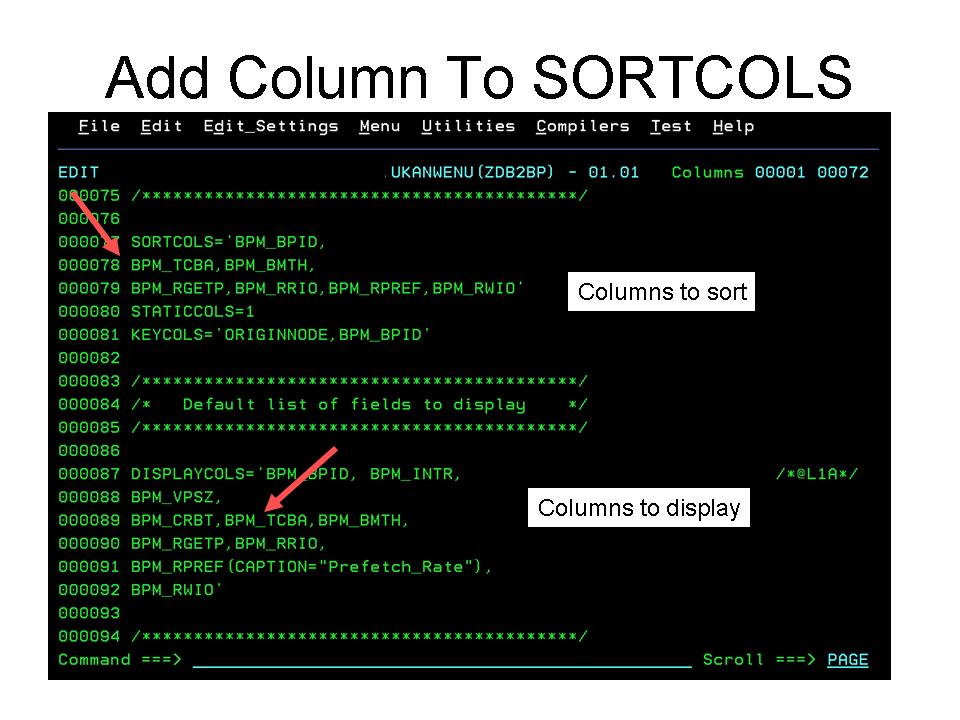
Below is an example of the ISPF edit required. The column we are interested in is the BPM_TCBA column. You can verify that by looking at the DISPLAYCOLS statement to see what column names are being shown.
 You then add BPM_TCBA to the SORTCOLS command. Save the panel and you are done. Again, as with the prior posts I've shown, I always recommend that modified panels go to the UKANWENU library. Do not modify the contents of the product provided RKANWENU library. To invoke the test panel, enter =ZDB2BP on teh command line and press enter.
In the example below we show the OMEGAMON DB2 buffer pool overview panel, KDPBPOOL. In the orginal panel you see several columns that are already sort eligible. What we would like to do is make the Pages In Use column also sort eligible.

Below is an example of the ISPF edit required. The column we are interested in is the BPM_TCBA column. You can verify that by looking at the DISPLAYCOLS statement to see what column names are being shown.
Tuesday, April 23, 2013
An interesting article on the future of the mainframe
Despite many predictions to the contrary over the years, the mainframe continues to be the workhorse platform for businesses and institutions. There's an interesting article in Enterprise Systems Media that discusses the topic. "Proof That the Mainframe is Thriving in the Modern Age" talks about how mainframe technology continues to be a strategic investment.
It's an interesting read. Here's a link to the article:
http://enterprisesystemsmedia.com/article/proof-that-the-mainframe-is-thriving-in-the-modern-it-age?utm_source=spotlights&utm_medium=newsletter&utm_content=IT+Mgmt+Spot+-+art&utm_campaign=p0f5q
It's an interesting read. Here's a link to the article:
http://enterprisesystemsmedia.com/article/proof-that-the-mainframe-is-thriving-in-the-modern-it-age?utm_source=spotlights&utm_medium=newsletter&utm_content=IT+Mgmt+Spot+-+art&utm_campaign=p0f5q
Monday, April 22, 2013
A customization example - changing the order of the columns on a e3270ui panel
One of the nice things about the e3270ui is you have the ability to easily change and customize the layout of the monitoring displays. The panels are members in the hilev.RKANWENU library. To change a panel you can make your edits and save the new panel in the hilev.UKANWENU user panel library. You can also build new panels and store them in the UKANWENU panel library.
Let's look at an OMEGAMON DB2 example. In the OMEGAMON DB2 thread display (KIPTHRD) you have quite a few columns of information to review. Perhaps, in your environment, columns such as Authid and Corrid may not be as useful to view as Workstation Id. In the example below you have to scroll to the right to find the Workstation Id.
 So, Workstation Id is on the panel, but perhaps you would like to see it without having to scroll the panel to the side. You can accomplish this with a straightforward edit ot the panel source.
Below we see the source code of the panel definition. Look for the DISPLAYCOLS command, and below that you will see the sequence in which the columns are displayed on the panel. The column we are looking to move is TDIDWKID. Use a standard ISPF edit command to move the column reference up in the panel code, as you see in the example below.
 Once you make the change, save and exit the panel edit session, and you can invoke the panel. Note that in the above example that rather than change the product provided panel , KIPTHRD, we made a new panel for testing purposes, ZDB2THRD. Please note, only make your changes and new panel creations in the UKANWENU library. Please refrain from changing the product provided RKANWENU library. To invoke the new panel, go to the original KIPTHRD panel, and then issue the following command on the command line, =ZDB2THRD.
 Here you have the new panel complete with Workstation Id now appearing towards the front. That's all there is to it.
Let's look at an OMEGAMON DB2 example. In the OMEGAMON DB2 thread display (KIPTHRD) you have quite a few columns of information to review. Perhaps, in your environment, columns such as Authid and Corrid may not be as useful to view as Workstation Id. In the example below you have to scroll to the right to find the Workstation Id.

Below we see the source code of the panel definition. Look for the DISPLAYCOLS command, and below that you will see the sequence in which the columns are displayed on the panel. The column we are looking to move is TDIDWKID. Use a standard ISPF edit command to move the column reference up in the panel code, as you see in the example below.


Friday, April 12, 2013
Building your own enhanced 3270 interface panels
Yes. You can build your own enhanced 3270 interface panels. It's actually fairly easy once you've done it once or twice and get the hang of it.
There are a few tricks of the trade to get it done. The first thing you will want to get your hands on is the "Enhanced 3270 Interface Guide" (SC22-5426-00). This manual contains a lot of the information you need to build and customize your own panels. Here's a link to the manual:
http://pic.dhe.ibm.com/infocenter/tivihelp/v15r1/index.jsp?topic=%2Fcom.ibm.omegamon_share.doc_623fp1%2Fsource%2Fe3270%2Fe3270_interface.htm
The interface guide documents all the keywords, and shows you many examples of how the panels are coded.
The nice thing is that the panels are just members in a PDS. When you create a new panel, or modify a product provided panel, put the new or updated panel in the -hilev-.UKANWENU library. Don't modify the -hilev-.RKANWENU members directly. Make a copy and put them in -hilev-.UKANWENU.
Testing a new panel is easy. Just enter =panelname (keeping in mind these are PDS members) on the command line and hit enter and your new panel should come up.
I'm working on some new panel ideas. And I will be blogging on my results.
Wednesday, April 10, 2013
Upcoming webcast presentation on System z storage tools
Coming up in May Kevin Hosozawa of IBM will be doing a webcast presentation on "Enhanced System z Storage Management with improved visibility and reporting". This presentation will cover how IBM is continuing to enhance the Tivoli System z Storage Management suite of capabilities to provide new functionality and capabilities in the z/OS Storage Management suite. The new enhancements to existing products provide numerous hard- and soft-cost benefits for IT. The alerting and integration capabilities are powerful and best-in-class and they help to maximize efficiency and effectiveness.
The presentation is on May 16th at 11 AM ET. The price for the webcast is right. No charge. To attend here is a link:
http://ibm.co/ZzZjR4
The presentation is on May 16th at 11 AM ET. The price for the webcast is right. No charge. To attend here is a link:
http://ibm.co/ZzZjR4
Subscribe to:
Posts (Atom)

 Posts

